


Amolivro
4.4675.00 Reviews
App Specs
- Version
- 5.2.1
- Updated On
- License
- Free
- Downloads
- 1,000,000+
- Developer
- Moboreader Technology USA Co Ltd
- Categories
- Books & Reference
- Platform
- Android
Screenshots


 Analysis by AppCompare
When a household shares a phone or tablet, a reading app can feel less like a private book and more like something everyone has to negotiate. I’d treat Amolivro as a personal reading space first: its appeal is romance fiction on the go, not a general-purpose family library. That distinction matters if you’re deciding whether to install it on a shared device or keep it on your own.
One device, different reading habits
Picture a familiar evening: one person wants to read a romance chapter while waiting for dinner, and another usually borrows the same tablet for videos or homework. The convenience is real, but the reading history, recommendations, and saved place may reflect whoever has been using the app. I would avoid treating one shared profile as a neutral household shelf. If people have different tastes, keeping reading activity separate is the cleaner approach, where the device and account setup allow it.
That also affects what I’d expect from the app. A book reader can be useful for browsing and continuing a story in short breaks, but it is not automatically a shared catalog with household-level organization. Before making it the family’s default reading option, try it with the person who will actually read the stories and see whether the selection and browsing style suit them.
Set expectations before handing over the screen
Amolivro is free to install, while in-app purchases range from under a dollar to nearly two hundred dollars per item. That broad range is worth discussing before a child or another family member uses the device: free access does not mean every reading choice is free. I’d check the purchase settings on the device and agree on who can authorize spending rather than assuming that a shared app is cost-free in every situation.
There is a practical account boundary here too. If several people use the same login, saved reading activity and personalized suggestions may become mixed together. I would not use a shared account for people who want private reading lists or distinct recommendations. A personal device or clearly separate sign-in arrangement is a better fit when individual privacy and continuity matter.
Coordinate without turning reading into a chore
For a couple or friends who enjoy the same kind of romance, the app can still be a useful starting point for conversation. One person can mention a story they have started, and the other can decide whether it sounds appealing; that is a lightweight way to coordinate without needing a formal book-club schedule. If a household wants to discuss a title together, agree on the title outside the app and avoid assuming that everyone’s progress will stay separate on a shared profile.
I’d also keep recommendations in perspective. A suggestion can help when you want another story in a familiar mood, but it should not be treated as a precise map of everyone’s interests on a shared device. If a recommendation feed begins reflecting another person’s choices, that is a sign to separate usage rather than repeatedly trying to retrain one mixed reading history.
Worth Reading Before You Choose

EA SPORTS FC Mobile 26 Is a Bigger Football Game, but It Takes Time

Flipboard Shows What News Apps Must Do Beyond the Feed

Switching to Android Auto Means Rethinking Your Driving Routine

Google Calendar Makes a Crowded Week Easier to Manage

Ludo King Makes the Most of the Minutes Between Plans

Baby Panda World Brings Quick Play to Modern Phones, but Its Game Library Feels Busy
For readers who want broad library borrowing, nonfiction research, or one place to manage books from many sources, a public-library reading service or a more general ebook reader may be a better match. Amolivro is more compelling when the goal is to browse and read romance stories, rather than to build a comprehensive household archive.
What the reading experience is best suited to
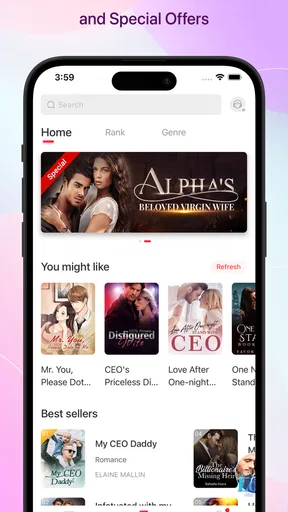
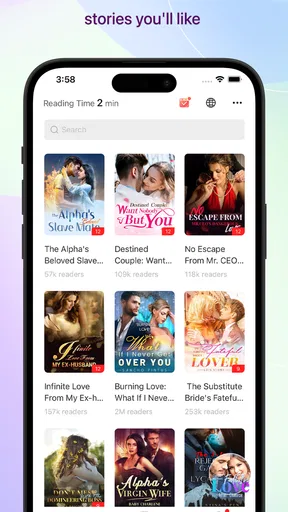
One of the first things I noticed about Amolivro is how it makes finding new books a breeze. You know how sometimes you wander aimlessly in a bookstore hoping for a title to jump out at you? Well, this app does that without you having to leave your couch. With its nifty recommendation engine, it suggests books based on your reading history and preferences. It’s like having a personal librarian who knows exactly what you’re into.
Plus, the app’s interface is super intuitive. Even if you’re not the most tech-savvy person, navigating through genres, authors, and trending books feels effortless. The search feature is robust, allowing you to filter results by category, popularity, or even the latest releases.
Keeping Your Library Organized
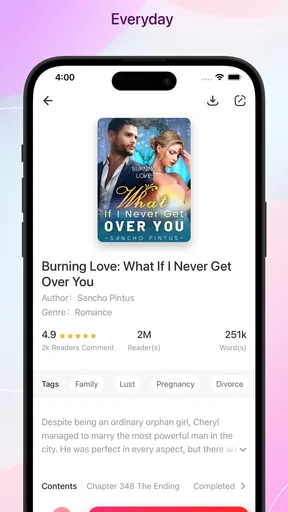
Another aspect I absolutely love is how Amolivro helps you organize your personal library. You can create virtual bookshelves, categorize your reads, and even set up a wishlist for books you’re dying to dive into. It’s perfect for those of us who like to keep our reading lists tidy and manageable.
And let’s talk about the notes and highlighting feature. If you’re like me and enjoy jotting down thoughts or marking memorable quotes, this app has you covered. You can highlight text and add notes seamlessly, making it easy to revisit those aha moments later on.
Connecting with Fellow Bookworms
We all know that one of the joys of reading is sharing thoughts and opinions, and Amolivro nails this aspect too. The app has an integrated community feature where you can join discussions, leave reviews, and even participate in book clubs. It’s like having a cozy book café right at your fingertips, where you can talk about your current read or discover hidden gems through recommendations from fellow users.
Another cool feature is the ability to follow authors and get updates on their latest works or upcoming events. It feels like you’re part of an exclusive club, getting the inside scoop straight from the source.
Seamless Reading Experience
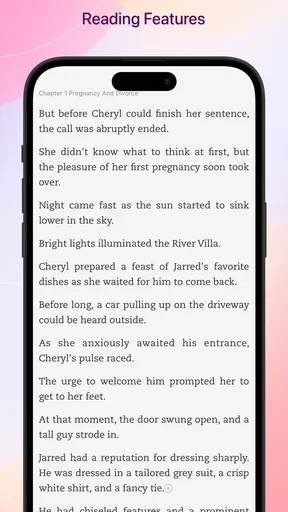
Now, let’s get into the reading experience itself. Amolivro offers a smooth and customizable reading interface. Whether you prefer the classic black text on a white background, or a softer sepia tone for those late-night reading sessions, you can adjust the settings to your liking. The font size and style can be modified too, ensuring that your eyes remain comfortable even during marathon reading sessions.
What’s more, the app remembers where you left off, so you can pick up right where you left, no matter which device you’re using. It’s little details like this that make the app feel like it’s tailored just for you.
Age, trust, and who should choose it
Because Amolivro is rated Mature 17+, I would not put it forward as a children’s reading app or hand it to a younger user without adult judgment. The rating is a useful boundary for households, not a substitute for deciding whether the content suits a particular reader. For an adult who wants romance fiction, it may be an appealing fit; for someone seeking children’s books, school reading, or a neutral family catalog, I’d look elsewhere.
The app comes from Moboreader Technology USA Co Ltd and is listed in the books and reference category. It has a 4.5 average from around 33 thousand ratings, with over a million installs. Those figures suggest it has found an audience, but they cannot tell you whether its romance selection matches your taste. I’d use the first browsing session to check whether the available stories and reading style are genuinely engaging for you.
It is currently version 5.1.5 and requires Android 6.0 or later. That makes compatibility worth checking on an older device before planning to use it as a household reader. If you depend on a particular phone or tablet for long sessions, test the reading comfort there first; a screen that feels fine for a quick chapter may not be your preferred choice for extended reading.
Final Thoughts
In a nutshell, Amolivro is a book lover’s paradise. It’s not just an app; it’s a companion that enhances your reading journey. From discovering new books and organizing your library to connecting with like-minded readers, it offers a comprehensive experience that’s hard to beat.
So, if you’re looking to enrich your reading life, give Amolivro a try. It might just become your new favorite app, helping you explore countless stories and connect with a vibrant community of book enthusiasts.
My recommendation is more specific: choose it when you want romance stories and expect to read as an individual, or when the adults sharing a device have agreed on account and purchase boundaries. Skip it if you need a child-friendly option, a library-borrowing tool, or one clean reading history for several people with different interests. That simple distinction makes it easier to decide whether it belongs on your personal phone or a shared household screen.
Pros
- User-friendly interface for easy navigation.
- Extensive library with diverse genres.
- Offline reading mode available.
- Customizable reading settings.
- Regular updates with new features.
Cons
- Limited audiobook selection.
- Requires account to access content.
- Ads in free version can be distracting.
- Some features locked behind paywall.
- Occasional app crashes reported.
FAQs for Amolivro
What is Amolivro and what does it offer?
Amolivro is a reading app designed to provide a seamless experience for book enthusiasts. It offers a vast library of eBooks across various genres, from fiction to self-help. Users can customize their reading experience with adjustable fonts and backgrounds, and even track their reading progress. It also includes a community feature for sharing reviews.
Is Amolivro free to use or does it require a subscription?
Amolivro offers both free and premium content. While many eBooks are available for free, some require a subscription to access. The premium subscription provides additional benefits such as ad-free reading, exclusive content, and early access to new releases. Users can choose between monthly or annual plans.
Can I read Amolivro books offline?
Yes, Amolivro allows users to download eBooks for offline reading. This feature is particularly useful for those who enjoy reading on the go without relying on an internet connection. Simply download your desired books while online, and they will be available in your library offline.
What devices and platforms is Amolivro compatible with?
Amolivro is available on both Android and iOS platforms, making it accessible on a wide range of devices including smartphones and tablets. The app is optimized for various screen sizes and offers a user-friendly interface, ensuring a smooth reading experience across different devices.
Does Amolivro support multiple languages?
Amolivro caters to a global audience by supporting multiple languages. Users can choose from a variety of language options for the app interface and also access eBooks in different languages. This feature enhances the app's appeal to non-English speaking users and multicultural readers.


